 ExplainThisDoc
Digitise paper documents at home: a simple filing system
A cupboard full of paper, plus photos of letters on your phone: for many people that is where digitising starts. This guide shows a simple system for a searchable digital archive at home, from the incoming mail to the backup, without folders. At the end it says honestly who a private archive is not enough for.
Why an archive without folders works
Anyone who wants to digitise paper documents at home rarely fails at scanning, but at the question that follows: which folder does the letter go in, what do I call the file, and where will I look in two years? A folder system demands a decision for every document and upkeep later, and sooner or later both get skipped.
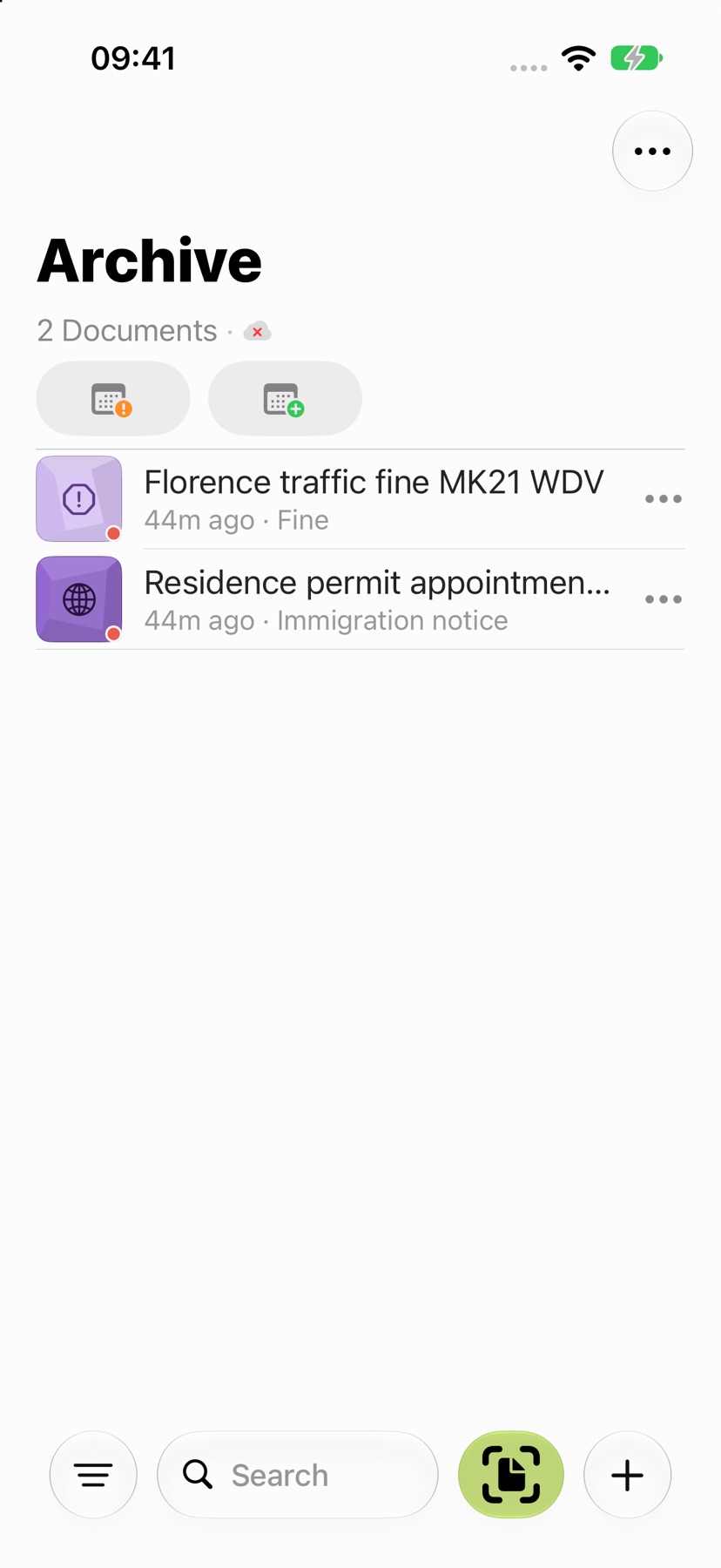
That is why ExplainThisDoc creates no folders. After the import, the app recognises the text on your device and gives the document a title, a document type and a summary. There are 20 document types, such as invoice, contract, tax or medical. In the list, an icon shows the type and a colour shows the area, for example finance and tax or health. Without an analysis, a document gets a simple title made from the date or file name. The single-letter routine is described in Scan and forget: file letters without folders; this guide is about the whole collection and the system behind it.
The process at a glance
A simple system consists of a few steps that repeat with every new piece of paper. The table shows what the app takes over each time and what stays with you.
| Step | What the app does | What you do |
|---|---|---|
| Scan or import | Page detection while scanning, up to 24 pages per scan; processing continues in the background. Import of files, photos and text. | Capture the letter or bring in the file. You pass on an email as a PDF via print and share. |
| Understand | Text recognition on the device, title, document type, summary. | Decide whether the free Light analysis is enough or whether Pro should explain more. |
| Deadline or action | Prepares a calendar entry once Pro has found a deadline; addresses open Apple Maps. | Check the entry and save it. The app does not remind you by itself. |
| File | Icon for the type, colour for the area, a hint about duplicates. | Change the title if needed, link related documents, write a note. |
| Find again | Search across titles, summaries, document types, deadline texts and notes; filters by area, period and status. | Search with a keyword, then search for exact passages in the opened document. |
| Back up | Optional iCloud sync; export of the whole archive as a ZIP file. | Turn iCloud on or off, create an export now and then and keep it somewhere safe. |
The following sections go through the steps. How to capture a document sharp and complete is shown in How to scan a document with your iPhone; setting up the app is covered in Getting started.
Incoming mail: scan, understand, note the deadline
You capture new mail in the archive with “Scan” or bring it in via “Import file” and “Import photo”. Typed text can be added too, and the app reads Office files such as Word, Excel or Pages. You cannot import an email directly: you print it as a PDF and share it with the app.
Understanding means two things. The free Light analysis runs with Apple Intelligence on supported devices and in supported languages. Pro explains in more detail and also finds deadlines, tasks and warning signs: 1 credit per analysis. If you only want to collect, set “Document analysis” in Settings to “Archive only” and analyse later.
Once Pro has found a deadline, the app prepares the calendar entry and you check and save it. Addresses in the explanation open Apple Maps. ExplainThisDoc sends no notifications of its own: the reminder is the entry you create yourself.
Filing and finding again
Filing is limited to what the app cannot guess. You can change a title, link documents that belong to one matter, such as a tenancy agreement, a service charge statement and an electricity bill, and write a note for each entry, including attachments from the camera, a scan or a file. You see the links as a list or a graph. If you import something twice, the archive points out duplicates.
To find something again, type a keyword into the search field. Archive search goes through titles, summaries, document types, deadline texts and your notes. It does not search every word of the originals: for an exact figure or sentence you open the document and use text search in the reader. Filters narrow things down by area, period and status, for example open tasks or documents with a note. For the period you can choose between import date and recognised year. More on this in Find your documents quickly on iPhone.
A note in your own words (“Tax 2024, house sale”) is therefore often the best search aid.
Tackling the old pile of paper in stages
The pile in the cupboard does not have to disappear in a single weekend. Start with the documents whose loss would hurt: IDs and certificates, contracts, insurance, paperwork for your home. The rest can follow in small portions, for example one year per evening. With the period filter “recognised year” you can later bring back one year in a targeted way.
One scan holds up to 24 pages. You capture longer files in blocks and link them. How to digitise certificates, house files and older papers one after another is described in Digitise old documents and deeds.
What happens to the paper and how to back up your archive
Whether you throw the original away is your decision, and for some papers the answer should be no. Which documents stay as originals and what to check before you throw anything away is covered in Keep or shred paper after scanning. An overview of how long to keep what is in Which documents to keep, and for how long.
Your archive is backed up in two ways. iCloud sync is optional: it syncs originals, explanations, recognised text and notes between your devices using the same iCloud account, can be paused or switched off, and does not share your archive with other people. Deletions are synced too. In addition, you can export everything as a ZIP file, with originals and notes, via the “⋯” menu of the archive with “Archive export”, and import it again later.
Who this archive is not meant for
ExplainThisDoc is a private archive. Self-employed people and businesses face record-keeping and integrity rules that a document management system (DMS) or your accountant's solution covers. The app has no features for this: no change logs, no procedure documentation, no certification, no clients and no accounting export. Originals, titles and notes can be changed and deleted freely. It is therefore not offered as a compliant or audit-proof business archive.
| Country | Who is affected | What is required |
|---|---|---|
| United Kingdom | Self-employed people, limited companies and VAT-registered businesses | Self-employed: keep records at least 5 years after the 31 January submission deadline. Limited companies: 6 years from the end of the last company financial year, longer in some cases, for example during an HMRC check. VAT records: at least 6 years. HMRC says you may discard paper after transferring it electronically if the storage method captures all the information needed and can reproduce it in a legible form; otherwise keep the original. |
| Ireland | Businesses that must keep records | Revenue requires you to keep the original of business records for six years. Electronic storage is allowed only if the process gives an assurance about the integrity of the record from the time it is first generated, allows a legible form and ready access, and meets Revenue's technology and procedural requirements (section 887 TCA 1997). Outsourcing to a provider does not release you from this. |
For the United Kingdom, the rules are on GOV.UK: records for the self-employed and company and accounting records (including VAT records), and the HMRC Compliance Handbook covers transferring paper records to electronic storage. For Ireland, see Revenue on keeping records. Other European countries, including EU member states, have comparable record-keeping rules for businesses; check the rules of your own country. This is orientation, not legal advice; if in doubt, ask your accountant.
Private individuals, by contrast, usually have no general legal duty to keep documents. In the United Kingdom, HMRC advises individuals to keep their tax records for at least 22 months after the end of the tax year, or 15 months after filing if the return was late. The app can still explain letters from HMRC or your accountant.
What ExplainThisDoc takes over for your archive
You scan or import, the app recognises the text, names the document, assigns type and area and summarises it briefly. With Pro analyses it finds deadlines and prepares the calendar entry. Later, search and filters bring the document back, and the original in the reader answers the question about the exact amount. Links and notes keep related papers together.
The limit: the app explains and sorts, it does not check anything legally and does not replace advice. You check deadlines yourself, and whether you must keep an original is for you to decide based on the rules that apply to you.
Start with your next letter
Snap or import
Scan a document or bring in a photo or PDF. No sign-up, no folders.
Understand it in plain words
Light analysis, free on your device¹. In depth with Pro: 1 credit per analysis.
Find it when you need it
The original, the explanation and your notes stay together in your archive.
- No sign-up
- No subscription
- Start right away

 Scan with your iPhone camera
¹ With Apple Intelligence enabled on a supported device and in a supported language.