 ExplainThisDoc
Handling mail for your parents or a relative
If you look after your parents, an ill partner or someone in your care, you often handle their mail too: health insurance, pension, care services, doctors' letters. The letters arrive irregularly and are hard to read. This guide shows how to keep track and how ExplainThisDoc helps.
Everything in one place
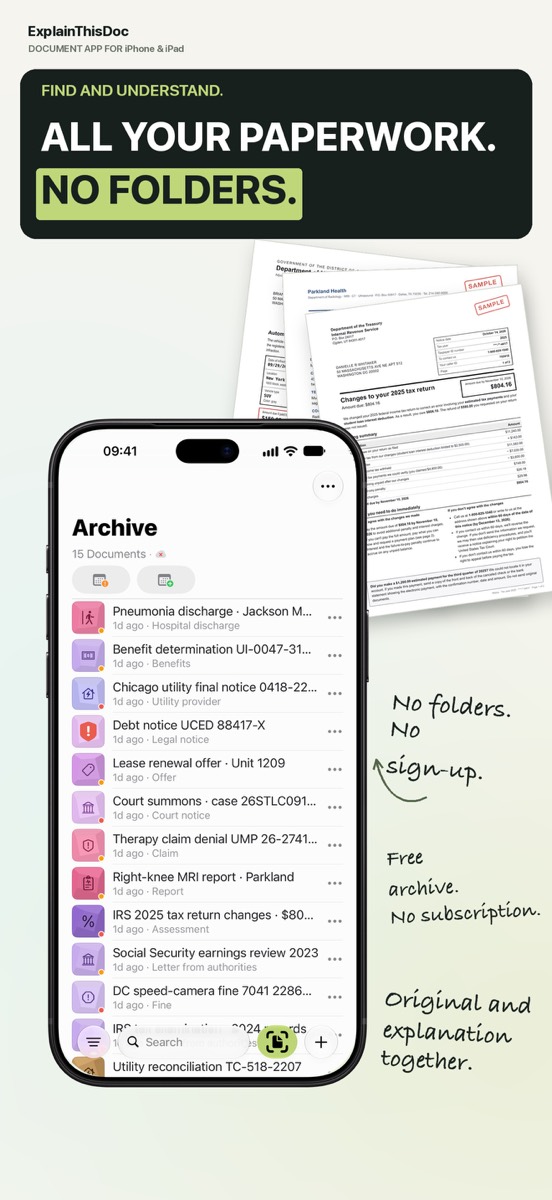
Photograph the letters when you visit, or have them sent to you and import them. A search word such as the insurer's name brings them back. Note: the archive lives on your device; there is no shared family library. iCloud only syncs between your own devices.
Understand difficult letters
Pension statements, care assessments, discharge letters: ExplainThisDoc explains the content in plain words and in your app language. With Pro you see what needs to be done and by when, and recognized dates become calendar drafts. Read more in the guide to discharge letters.
Prepare and record your questions
Note questions and answers right next to the letter: whom you called and what was agreed. When the next letter arrives, the context is already there. Make sure the person concerned agrees that you manage their documents.
Start with the next letter
Snap or import
Scan a document or bring in a photo or PDF. No sign-up, no folders.
Understand it in plain words
Light analysis, free on your device¹. In depth with Pro: 1 credit per analysis.
Find it when you need it
The original, the explanation and your notes stay together in your archive.
- No sign-up
- No subscription
- Start right away

 Scan with your iPhone camera
¹ With Apple Intelligence enabled on a supported device and in a supported language.